A twelve-person equipment dealer once asked me to sit in on a Salesforce CRM demo. The vendor’s rep walked through lead scoring, territory rules, and a forecast dashboard. The dealer’s sales manager leaned over and asked me, “Who’s going to build all that?” That question is the whole review. Salesforce can do almost anything you describe, and that’s the reason small teams get into trouble with it.
I’ve set up Salesforce for teams of eight and cleaned up after implementations for teams of eighty. The product rewards companies with a defined process, a patient admin, and a budget that survives year two. It punishes companies that buy it because it’s the safe logo on the proposal.
What Salesforce CRM Actually Is
At its core, Salesforce CRM is accounts, contacts, opportunities, activities, and reports. A rep can log a call, move a deal through stages, and see a forecast. That part is straightforward. The complexity comes from everything around the core: custom objects, permission sets, validation rules, flows, and a marketplace of add-ons that each carry their own license and setup cost.
Salesforce CRM is really a development platform with a sales application on top. If you need a custom approval chain for discount requests or a partner portal that shares inventory, that flexibility is worth real money. If you need a clean pipeline and a weekly activity report, you’re buying a workshop when you needed a hammer.
The Edition Ladder and What Each Step Buys
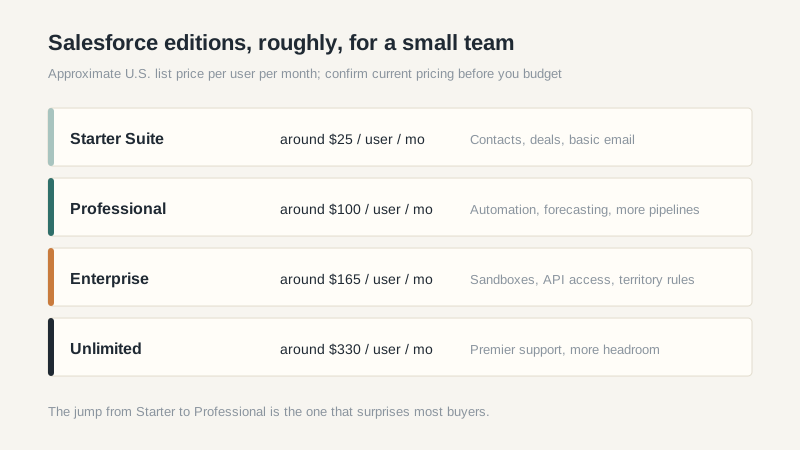
Salesforce sells several editions, and the names have changed enough over the years that you should confirm the current lineup before you budget. As a rough guide, the entry-level sales package runs around $25 per user per month, the professional tier sits near $100, and the enterprise tier runs above $150. List prices move, discounts exist, and annual billing changes the math.
The important part is what sits behind each gate. Entry tiers usually cover contacts, deals, and basic email integration. Automation, multiple pipelines, forecasting, sandboxes, and API access tend to start higher up. That means the edition you demo is often not the edition you’ll need six months after launch, once someone asks for a second pipeline or a custom report.
Ask for a written feature comparison at your expected user count, not a slide with checkmarks. Then ask which features require an add-on license. CPQ, marketing automation, and service tools are separate products with separate contracts, and the bundle discount you hear about in the sales call may not survive procurement.
Implementation Is the Real Line Item
Salesforce doesn’t implement itself. A U.S. partner will typically quote somewhere between $10,000 and $50,000 for a small deployment, depending on integrations, data volume, and how much of your process needs custom work. You can do it internally, but only if you have someone who knows the platform and has the time to learn its quirks.
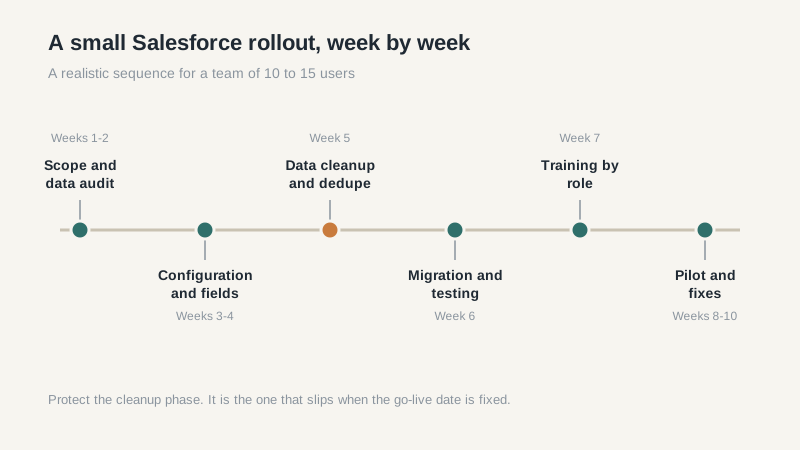
Data migration is where budgets slip. The last migration I sat through lost two weeks because nobody cleaned the account list before cutover. Duplicate accounts became duplicate opportunities, and the reporting layer inherited the mess. Clean your data in the old system first. It’s slower, and it’s cheaper than cleaning it twice.
Integrations deserve their own line. A quote-to-cash link, an ERP connection, or a marketing tool can each add setup time and a monthly fee. Get the integration scoped by someone who has actually built one, not by the sales engineer who is measured on the deal closing.
Where Salesforce CRM Starts to Hurt
Administration is the slow leak. Salesforce ships three major releases a year, and each one can change how a screen looks or how a flow behaves. Someone has to test the changes, manage user permissions, and answer the “why can’t I see that field” questions. In a small company, that person is usually the sales operations manager, the finance lead, or the owner’s most technical employee.
The second leak is reporting. Standard reports are fine. Anything involving attribution, multi-touch pipelines, or blended forecasts tends to require a consultant, a BI tool, or both. The license gets you the data. It doesn’t get you the answer.
Small teams often pay for headroom they never use. If you have one product line and one sales motion, a simpler tool will do the job for a fraction of the total cost. Salesforce is a good product for the right company. It’s an expensive hobby for the wrong one.
A Smaller Team’s Exit Ramps
If you’re under fifteen users and your process fits on one page, look at lighter tools first. Our best CRM software comparison covers the options I see most often in small U.S. teams, with rough pricing and the tradeoffs that matter. You can always move up later. Moving down is harder because the data model and the integrations tend to follow you.
Keeping Salesforce means simplifying before you customize. One pipeline, fewer custom objects, standard reports, and a short list of required fields. Every object you add is a screen a rep has to learn and a report someone has to maintain. The teams that get value from Salesforce are usually the ones that resisted the urge to build everything at once.
What I’d Ask Before Signing
Ask which edition includes API access, how much a sandbox costs, and whether the contract includes any implementation hours. Ask what happens at renewal if your user count drops. Ask for the export process in writing, including custom objects. Ask who owns the configuration and whether you can take it to another partner.
Then ask for a thirty-day pilot with real data and three reps. Salesforce can support a pilot, but you have to insist on it. A polished demo with sample records tells you almost nothing about week three, when the reps are behind on follow-ups and the dashboard is wrong.
One more thing: read the renewal clause. Multi-year discounts are real, but so are automatic uplifts. If you can’t explain the year-three number to your finance lead without opening the contract, you’re not ready to sign. For a deeper look at the platform’s naming and structure, our SFDC CRM guide walks through the pieces without the sales pitch.
