Most customer relationship management projects fail for a boring reason: nobody agrees on what a qualified lead looks like before the software goes live. I watched a ten-person sales team spend six weeks configuring stages, only to find that half the reps logged calls in their email inbox and the other half used a shared spreadsheet. The software was fine. The process underneath it wasn’t.
That pattern repeats across small U.S. sales teams. A CRM is a database with a sales process bolted on. If the process is fuzzy, the database records the confusion faster. So before you compare vendors or sign a contract, spend a week writing down how a lead moves from first touch to closed deal, who owns each step, and what evidence proves the step happened.
Start With the Definition, Not the Demo
Vendors demo their best-case workflow: a clean lead arrives, an alert fires, a rep calls within minutes, and the deal closes. Your reality includes duplicate records, trade show badge scans, inbound emails with no phone number, and a rep who quit last month leaving forty open opportunities. Ask the vendor to show that mess. If the demo only works with pristine data, you’re looking at a configuration project, not a product.
Write a one-page lead definition before you shop. Include the source, the minimum contact fields, the owner, and the response window. For most teams I’ve worked with, that page does more for close rates than any automation rule. It also gives you a scorecard for demos: either the tool can enforce your definition or it can’t.
Customer Relationship Management Lives or Dies on Adoption
Adoption isn’t a training problem. It’s a workload problem. Reps skip CRM updates when the update takes longer than the call. Every field you add is a tax on the person who has to fill it. The teams that stick with a system keep required fields under about eight and push everything else into optional notes or a connected inbox.
I ask sales managers one question during a cleanup: what happens when a rep doesn’t log an activity? If the answer is “nothing,” the CRM is a suggestion box. If the answer is “their pipeline review gets uncomfortable,” it’s a system. You don’t need a punishment culture. You need a weekly review where the CRM is the only source of truth, and everyone knows it.
The Fields You Need and the Ones You Don’t
Start with company, contact, source, stage, amount, close date, and next step. Those seven fields cover most business-to-business pipelines. Add industry and employee count only if you segment by them. Custom fields for “favorite trade show” or “LinkedIn handle” are where small teams get lost; they create maintenance work and rarely change a decision.
Picklist values deserve the same discipline. If your industry list has sixty options, reps will pick the first one that looks close, and your reporting will be noise. Cap it at twelve to fifteen values and add an “Other” option with a note field. Review the list twice a year and merge the values nobody uses. None of this is glamorous, but it’s the part of customer relationship management that decides whether the data is usable in six months.
Pipeline Stages That Match How You Actually Sell
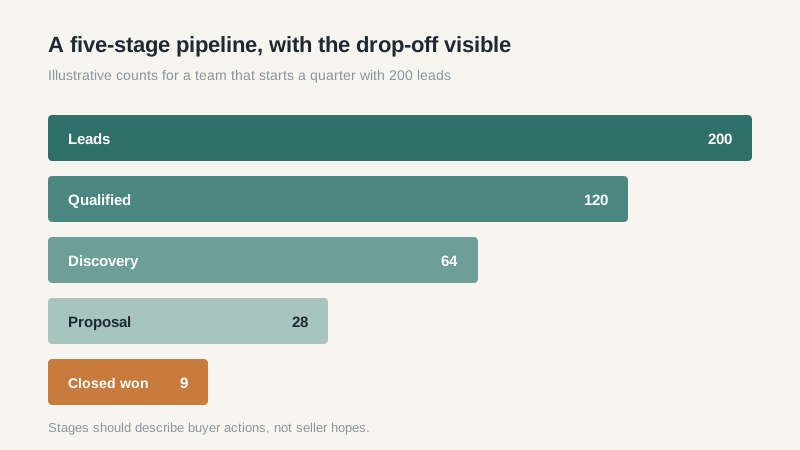
A stage should represent a buyer action, not a seller hope. “Demo scheduled” is a stage. “Interested” is a mood. I like four to six stages for a small team: qualified, discovery, proposal, negotiation, and closed. If your sales cycle includes a technical validation or a procurement review, give it a stage, because those steps are where deals stall.
Attach an exit criterion to each stage. For example, a deal leaves discovery only when you’ve confirmed budget, decision maker, and a timeline. That sounds basic. In practice, it’s the difference between a forecast you can defend and a number you invent on the last Friday of the quarter.
Reporting Habits Worth Building
Most small teams need three reports: pipeline by stage, win rate by source, and deals with no activity in fourteen days. The third one is the most useful and the least used. It surfaces the deals that are quietly dying while everyone celebrates a busy week.
Build the reports with the reps, not for them. A report that answers a manager’s question but not a rep’s question won’t get maintained. When a rep can see which of their deals are stuck, they’ll update the record to get the reminder off their back. That’s adoption disguised as self-interest, and it works.
What It Costs in the U.S. Market
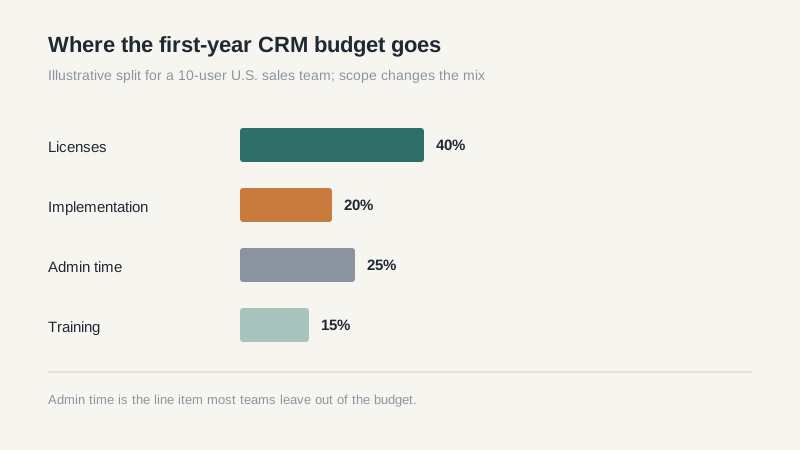
For a small U.S. team, expect $15 to $50 per user per month for a solid core CRM, and $75 to $150 for tiers that include automation, forecasting, and advanced reporting. Implementation is separate. A modest configuration, data cleanup, and two training sessions usually lands between $3,000 and $15,000, depending on how much history you’re migrating.
The line item people forget is administration. Someone has to own fields, reports, integrations, and user access. In a ten-person team that’s often ten to twenty percent of one person’s week. Budget for it in the job description, not in the hope that the sales operations fairy will handle it.
If the budget is tight, a free tier can carry you for a year while you fix the process. Read our notes on free CRM options for small business before you assume you need the paid tier on day one.
Questions to Ask Before You Sign
Ask how the vendor handles duplicate merging, what happens to your data if you leave, and whether the API is included in your tier. Ask for the price of the next tier up, because you’ll likely need it in eighteen months. Ask who supports the account after onboarding and whether that person is in your time zone.
Then run a two-week pilot with three reps and real leads. Not a sandbox with fake data. Real leads, real follow-ups, and a Friday review of what broke. You’ll learn more in ten business days than in six polished demos.
The blunt version: customer relationship management is a management system that happens to have software attached. Buy the software after you’ve decided how you’ll manage. If you’re still comparing products, our best CRM software comparison covers the tools I see most often in small U.S. teams.
