HubSpot CRM has the best free demo in the category, and that’s exactly why so many small teams end up on the wrong plan. The free tier is real. The jump from free to the tier you actually need is where budgets get tested. I’ve watched a five-person sales team sign up on a Tuesday and commit to a five-figure annual contract by Friday, mostly because the demo made the upgrade feel like the next obvious click.
It’s a good product. I recommend it often, usually to companies that sell through content and email and want sales and marketing in one place. I also talk people out of it, usually when they only need a pipeline and a reminder to call people back.
What HubSpot CRM Gets Right
The contact record is the strongest part. Emails log automatically, meetings sync to the calendar, and a rep can see the last five touches without opening a second tab. The free tier includes contacts, deals, tasks, forms, and a shared inbox, which is more than most competitors give away. For a team that lives in email, that inbox integration is what drives adoption. Reps don’t have to change their habits to keep the record current.
The interface is also unusually clean for a CRM. New users can find the pipeline, log a call, and add a note without a training session. That sounds minor until you’ve rolled out a tool that requires a twelve-page cheat sheet. Adoption is the hardest part of any CRM project, and HubSpot removes a lot of the friction.
The Tier Cliff
Pricing changes often, so treat these as approximate list prices per user per month on annual billing. The free tier is $0. Starter runs around $20. Professional sits near $100. Enterprise is above $150. The multiplier between Starter and Professional is the one that catches people, because Professional is where most sales teams find the features they assumed were standard.
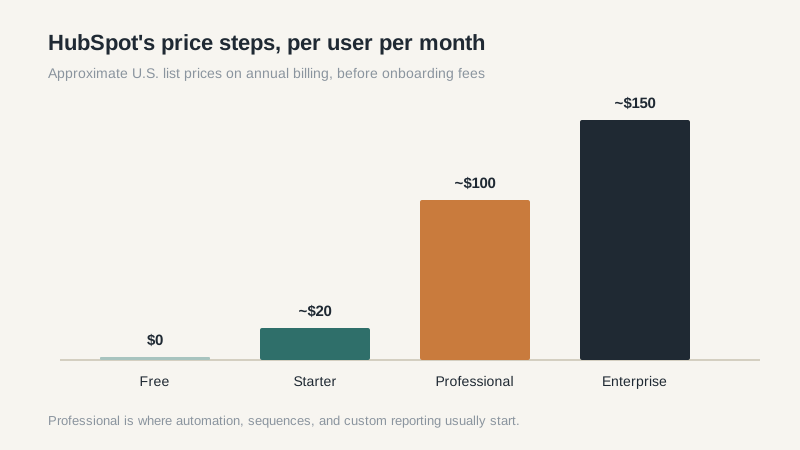
That tier includes sequences, custom reporting, forecasting, and more automation. Starter includes basic automation and simple templates. If your process depends on a multi-step follow-up sequence or a dashboard you build yourself, you’re probably looking at Professional. If you only need a shared pipeline and email logging, Starter is enough.
Watch the onboarding fee and the annual commitment. HubSpot often quotes a professional services package with the subscription, and the first-year number can be noticeably higher than the per-seat math suggests. Ask for the year-two renewal number in writing before you sign.
Contact-Based Pricing, Explained
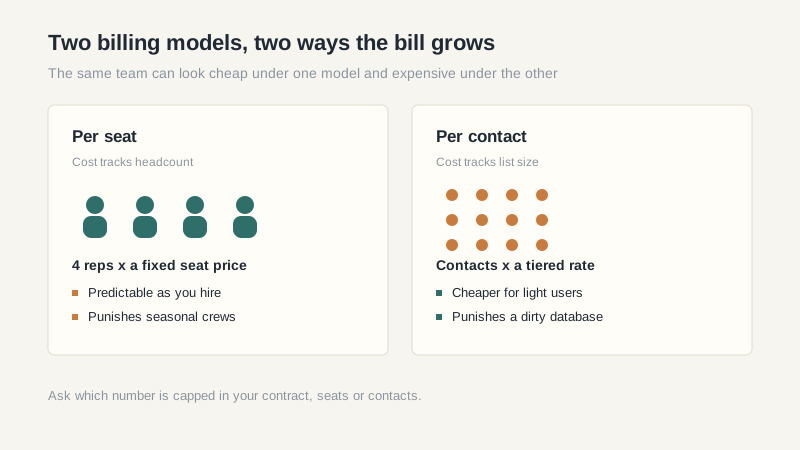
HubSpot’s marketing pricing counts the contacts you market to, not every contact in the database. Sales seats are priced separately. That means your bill grows along two axes: people who log in, and people you email. A team of five reps with a 50,000-contact list can pay more than a team of twenty reps with a clean 5,000-contact list.
Clean your list before you negotiate. Merge duplicates, remove bounced addresses, and decide which contacts are genuinely marketing contacts versus people who should sit in a sales-only record. I’ve seen a cleanup cut a marketing contact tier by a third, which is real money at renewal. Do that work in the trial, not after the contract starts.
Reporting and Sales Workflow
Standard reports are easy to read, and the dashboard builder is friendly. Custom report building, attribution, and multi-touch revenue reporting sit behind the higher tiers, and even then you may want a separate BI tool for anything unusual. HubSpot CRM is priced for sales and marketing alignment, but its reporting is strongest when your funnel follows a fairly standard inbound shape.
Deal stages are flexible, and the workflow builder is one of the easier ones to learn. Sequences work well for outbound follow-up, though the deliverability and inbox rules still apply; no software can make a bad list perform. The sales side is solid without being deep. If you need complex approval chains or territory rules, you’ll feel the ceiling.
One more cost trap: the quote often includes seats for people who only need to view a dashboard or cover for someone on leave. Audit the seat list before you sign. View-only users and occasional collaborators still add up at renewal, and a five-seat difference is real money at Professional pricing.
Who Should Buy HubSpot CRM
The best fit is a business-to-business team of five to fifty people that generates leads through content, webinars, paid search, or a newsletter, and wants one login for marketing and sales. A ten-person team that sends a weekly newsletter and runs a webinar once a quarter is the sweet spot. If your marketing lead already uses HubSpot’s email or forms tools, the CRM is a natural extension, and the shared contact record saves a lot of “did marketing already talk to them” conversations.
It also fits companies that will actually use the marketing features. The value of the platform comes from the combination. If you buy Professional and only use the deal pipeline, you’re paying for a marketing suite and ignoring most of it.
Who Should Walk Away
Walk away if you have a highly custom sales process, a heavy ERP integration, or a procurement cycle that needs line-item approvals. Walk away if the per-seat price at Professional is a real constraint for your team; there are good tools at a third of the cost. Our best CRM software comparison lays out the alternatives by fit rather than by feature count.
Also walk away if you only need a simple pipeline and you’re not doing inbound marketing. You’d be buying a marketing platform to store phone numbers. Start with a lighter tool, or read our guide to free CRM options for small business and give yourself a year to grow into the paid tier.
If you do buy, start on the free or Starter tier and set a sixty-day review. Write down the specific limit you hit before you upgrade. “We need sequences” is a reason. “The demo looked better” is not. That one habit will save you more than any negotiation tactic.
