A two-person agency once asked me to set up “whatever is free.” Six months later they were paying for three tools that did what one CRM should have done, and the owner was reconciling spreadsheets on Sunday nights. The free plan wasn’t the problem. The missing exit plan was.
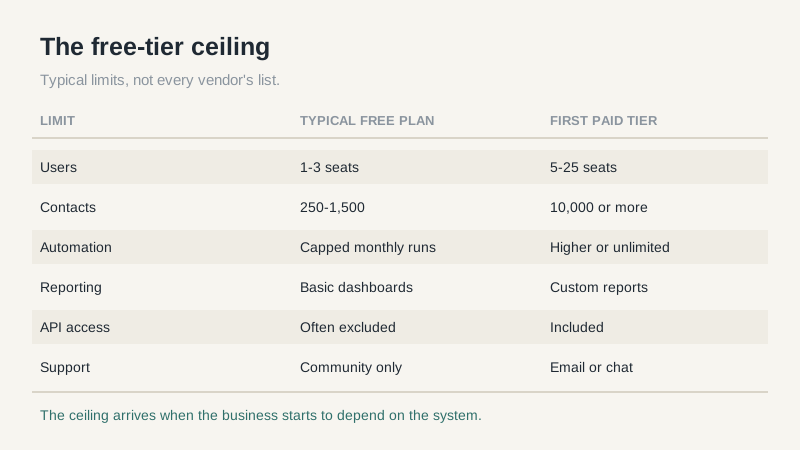
A free CRM for small business is a legitimate starting point. Several vendors offer real products at no cost, not crippled demos. The catch is that free tiers are designed around a ceiling, and the ceiling usually arrives right when the business starts to depend on the system.
What “Free” Usually Means
Most free plans limit one of four things: users, records, automation, or support. User caps are the most common, often one to three seats. Record caps range from a few hundred contacts to a couple thousand. Automation may be capped by monthly runs, and support may be community-only.
Some plans also exclude the API, custom reporting, or role-based permissions. Those sound like technical details until you try to connect a form, build a forecast, or stop a junior rep from exporting the whole database.
Read the pricing page twice. The free column often lists features that are included but limited, and the limits live in a footnote or a help article.
The Free CRM for Small Business Checklist
Before you import a single record, get answers to these questions in writing.
- How many users are included, and what happens when you add the fourth?
- Is there a contact or record cap, and does the account go read-only at the cap?
- Can you export contacts, activities, notes, and attachments in a usable format?
- How many automation runs are included per month?
- Does email sync log both directions, or only outbound?
- Can you build a pipeline report by owner and stage without a paid add-on?
- Can you restrict record visibility by role?
- What does the first paid tier cost per user, and what does it add?
If a vendor won’t answer the export question clearly, that’s your answer. Data portability is the one feature you can’t add later.
Where Free Tiers Break
The first break is the seat cliff. A plan that works for two people becomes a budget decision at four. The jump from free to paid is often larger than the jump between paid tiers, so the “free” phase can end with a bill that’s higher than the competitor you didn’t evaluate.
The second is reporting. Small teams don’t need much until a lender, a board member, or a new sales manager asks for pipeline by source and stage. If the free plan only offers a default dashboard, you’ll be exporting to a spreadsheet every week, which is exactly the habit a CRM is supposed to replace.
The third is data lock-in. Free plans are more likely to limit exports, exclude attachments, or make bulk operations a paid feature. The cost of leaving can exceed the cost of the subscription you avoided.
Support is the fourth break, and it’s the one small teams underestimate. Community forums are fine for a how-to question. They’re useless when a sync fails the day before a board meeting. Check whether the free plan includes email support, what hours it covers, and whether the vendor publishes a status page. A paid tier with real support can be worth more than a feature you’ll never open.
A Three-Year Cost View
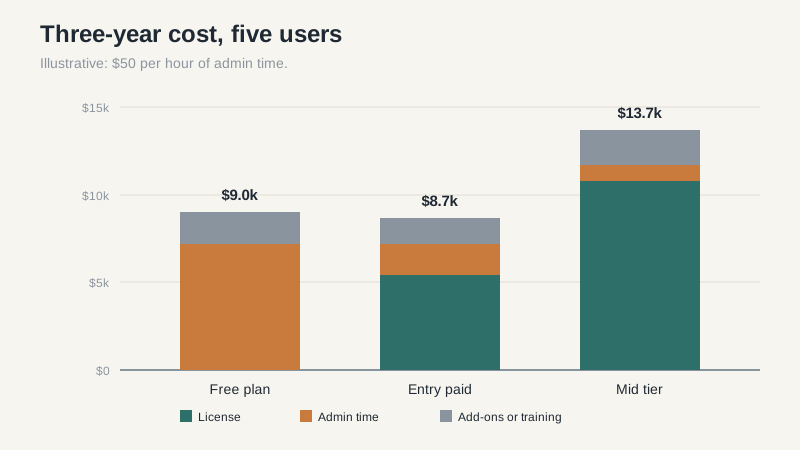
License fees are the easy part. Add the hours spent on workarounds, the migration you’ll do when you outgrow the plan, and the tools you buy to fill gaps. If a $15-per-user plan saves your operations person three hours a month, it pays for itself at almost any small-business labor rate.
Run the math with your own numbers. Five users at $15 per month is $900 a year. Five users at $30 is $1,800. Neither is the deciding number. The deciding number is what a lost deal costs when a follow-up slips because the pipeline lived in two places.
Free plans also tend to have thinner security and audit features. If you handle customer payment data or health information, check what the free tier actually includes before you store anything sensitive.
When Free Is the Right Call
A solo founder with a simple pipeline should start free. A two-person team testing whether they need a CRM at all should start free. A business with a short sales cycle, fewer than 500 contacts, and no reporting obligations can stay free for a long time.
Most other teams should plan to move to a paid tier within a year. That’s not a knock on free plans. It’s how they’re priced. The free tier is a trial with a longer runway, and the vendor is betting you’ll upgrade when the ceiling arrives.
Set a review date now. Pick a date six months out and ask three questions: are we at a limit, are we exporting to spreadsheets, and has a new hire asked for access? Two yes answers mean it’s time to pay.
What to Do Before You Import Anything
Clean your source list first. Remove duplicates, decide which fields you’ll actually maintain, and write down your stages in plain language. Importing a messy spreadsheet into a free CRM gives you a messy CRM with a login screen.
The best free CRM for small business is the one you can leave cleanly. Test that before you test the interface.
Pick two free plans, import the same 200 records into each, and run one real week. Time how long it takes to log a call, find a contact, and build a pipeline view. By Friday the choice is usually obvious, and you’ll know exactly what the first paid tier needs to fix. If you’d rather start from a broader shortlist, read a product comparison first, then come back to the free tiers with specific requirements.
