A selection committee I worked with once built a forty-row scorecard, weighted every feature, and chose the product with the highest total. Ninety days after launch, forty percent of the sales team had stopped logging activity. The best CRM on paper lost to the one people were willing to open.
That’s the trap in most buying processes. Feature matrices reward breadth, and breadth is easy to demo. Fit is harder to see in a one-hour presentation. If you’re trying to find the best CRM for a team of five to fifty sellers, the decision comes down to four things: whether reps will use it, whether you can report from it, what it costs to run, and how hard it is to leave.
Start With the Process, Not the Product
The best CRM decision starts before the first demo. Write your sales stages on one page, and for each stage name the exit criteria and the one field a rep must update. If you can’t describe the process in a page, no tool will fix it, and every vendor will sell you a different opinion about how selling should work.
Then count the handoffs. Who touches a deal after the first call? Does marketing own the lead until qualification? Does delivery see the closed deal? Handoffs are where CRMs earn their keep, and they’re also where most implementations get vague.
What “Best CRM” Should Mean for Your Team
Fit depends on your sales motion. A transactional inside-sales team needs speed, list views, and activity capture. A consultative team with long cycles needs opportunity history, stakeholder tracking, and reliable forecasting. A field team needs mobile performance and route-friendly views. The same product can be excellent for one and exhausting for another.
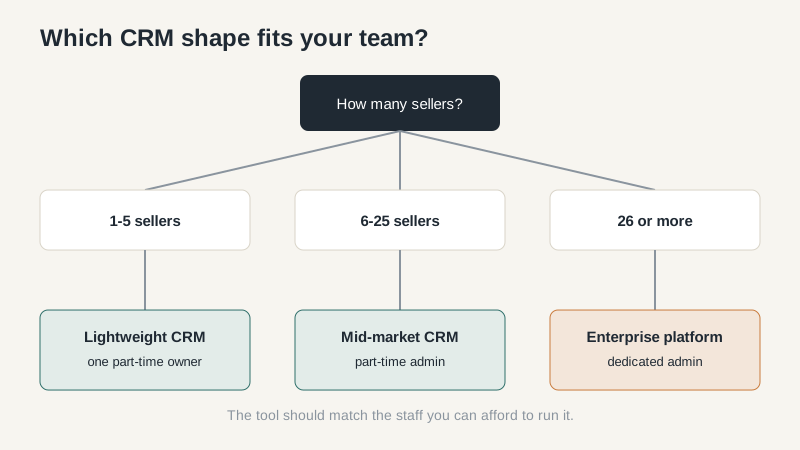
Team size changes the answer more than most buyers admit. Under ten sellers, administration is usually a part-time job held by someone who already has another job. Above twenty-five, reporting and permissions start to justify a dedicated admin. The tool should match the staff you can actually afford.
Existing systems matter too. If finance runs on one platform and support runs on another, a CRM that connects cleanly is worth more than a slightly better standalone tool. Integration debt shows up later as manual reconciliation.
The Four Criteria That Predict Success
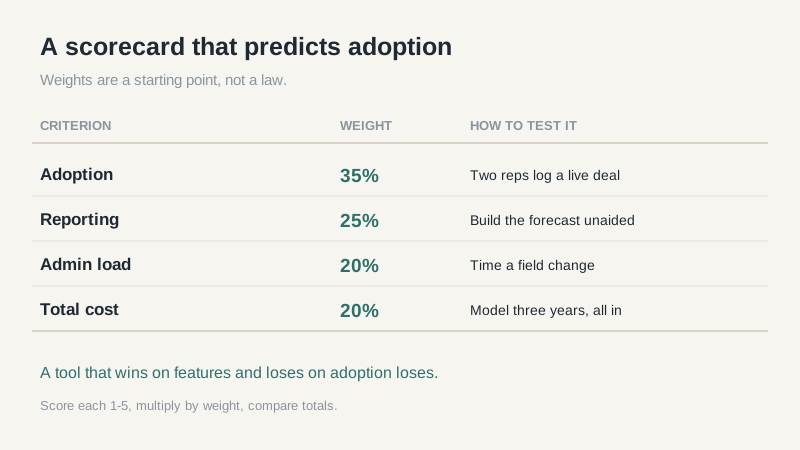
Score every vendor on the same four dimensions, and weight them honestly. My default weighting for small and mid-sized teams looks like this.
| Criterion | Weight | How to test it |
|---|---|---|
| Adoption | 35% | Have two reps log a live deal during the trial. |
| Reporting | 25% | Build your weekly forecast without vendor help. |
| Admin load | 20% | Time a field change and a permission change. |
| Total cost | 20% | Model three years, including migration and training. |
Adoption deserves the largest weight because every other benefit depends on data being in the system. Reporting comes second because a CRM that can’t answer “what will we close this month” is an expensive activity log. Admin load and total cost keep you honest about the long run.
A One-Week Evaluation That Beats a Demo
Give every finalist the same script. Import the same 300 records. Build the same pipeline. Ask each rep to log one call, one email, and one meeting. Then ask them to find the last touch on an account and change the close date. Time each step.
On day three, ask for the report your sales manager actually uses. On day four, test permissions with a rep who shouldn’t see the whole pipeline. On day five, export everything and inspect the file. Vendors who get defensive about the export test are telling you how the relationship will go.
Keep a written log of what broke and how support responded. Response time during a trial is usually better than response time in month eight, so treat it as a best-case signal.
Where Buyers Overpay
The first overpay is an edition above the one you need. Vendors price the reporting and permission features you’ll want in year two into a tier that also includes modules you’ll never open. Buy the tier that solves the next twelve months, and negotiate an upgrade path.
The second is implementation. Partners are often necessary for complex migrations, but a five-person team rarely needs a six-figure build. Ask for a fixed-scope phase one and a separate quote for phase two. Budget 10-15% of first-year license for training, and don’t let it be the line item that gets cut.
The third is seats. Teams routinely buy for headcount they plan to hire and then pay for empty licenses for a year. Start with current users plus two, and confirm how prorated seats work.
Red Flags in the Sales Cycle
Watch for a vendor who won’t provide a sandbox, won’t show a live export, or quotes implementation before understanding your data. Watch for references that are all enterprise customers when you’re a twelve-person team. Watch for discounts that expire in 48 hours. Urgency is a sales tactic, not a buying signal.
Also watch your own team. If the loudest voice in the evaluation is the person who will never use the tool, weight that opinion accordingly. The reps who log activity every day are the real users, and their patience is the budget you’re spending.
The Blunt Version
Most teams under twenty-five sellers should choose a mid-tier product with strong reporting, budget for an admin, and plan to revisit the decision in eighteen months. The perfect platform doesn’t exist, and the search itself has a cost. Pick the tool that fits your process today, clean your data before migration, and measure adoption at 30 and 90 days.
Before the next demo, write your top three criteria on one page and send them to the vendor in advance. If they can’t speak to those criteria in the first twenty minutes, the meeting is over. For a broader product shortlist, pair this framework with a side-by-side comparison, and use the basics guide to align your team on what the system is for.
