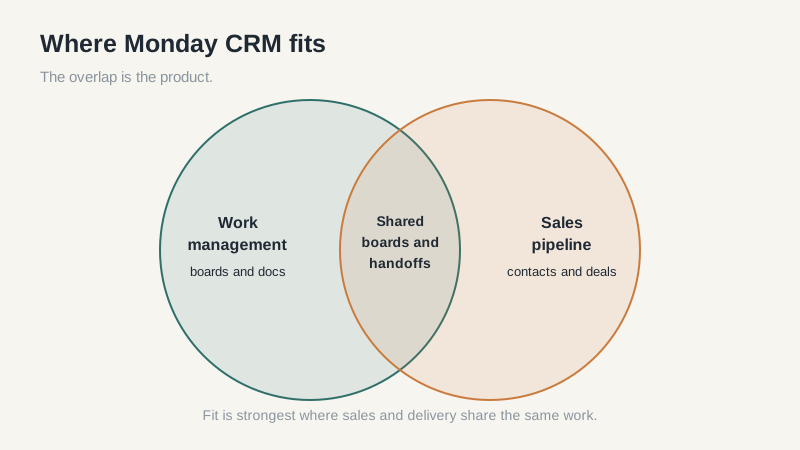
The first thing to know about Monday CRM is that it grew out of a work-management product, not a sales database. That origin shows up within the first week, in good ways and bad ones. Setup is fast, the interface is friendly, and people who don’t consider themselves “CRM people” will actually open it.
The tradeoff is depth. If your sales process needs strict stage gates, territory rules, and a forecast that ties to the general ledger, Monday CRM will feel like a project board wearing a sales suit. For some teams that’s enough. For others it’s a year of workarounds.
What Monday CRM Does Well
Adoption is the strongest argument. Boards are visual, columns are easy to change, and a rep can understand the pipeline in a few minutes. Teams already using monday.com for projects get a short learning curve because the interaction model is familiar.
The automation builder is genuinely useful for small teams. You can move a deal when a form is submitted, notify an owner when a stage changes, or create a task when a call is logged. None of that requires an admin or a consultant.
Collaboration across functions is another real strength. Marketing can see the campaign board, delivery can see the handoff, and sales can keep the deal in the same workspace. In a small company, that shared view often matters more than a deeper sales feature set.
Where the CRM Model Feels Thin
Reporting is the first place the product shows its project-management roots. Basic pipeline views and dashboards are fine. Multi-level forecasts, weighted pipelines with custom probability models, and reports that join activity data to revenue take more setup than most teams expect. If your board wants a weekly forecast by rep, segment, and stage, test that report before you commit.
Data hygiene tools are lighter than dedicated CRMs. Duplicate detection, merge rules, and field-level validation exist, but they aren’t the center of the product. On a list of a few thousand contacts, that difference is manageable. On a list of fifty thousand, it becomes a weekly chore.
Email and activity capture work, but the sales-specific polish varies. Check how threads log, how attachments are handled, and whether a rep can see the last touch on an account without opening three records. Those small frictions decide whether the data stays clean.
Forecasting is the other gap. A simple weighted total is easy. A forecast that accounts for stage age, rep history, and slipped close dates takes custom fields and a report builder most teams don’t have. Ask the vendor to show a forecast that changed because a deal went quiet for three weeks. If that demo takes a consultant, budget for one.
Pricing and the Seat Math
Monday CRM is priced per seat, with annual billing cheaper than monthly. List prices sit roughly between $12 and $30 per user per month for the main tiers, with enterprise pricing quoted separately. Check the minimum seat count and the feature gates before you compare it to a $15 competitor, because the tier that includes the reporting you need may be two steps up.
The bigger number is total cost per rep. Add implementation time, data migration, automation action limits, and the internal hours spent building views. A tool that costs $20 a seat can cost $35 a seat in practice once you account for the work around it. That’s still cheap compared with an enterprise CRM nobody uses, but it isn’t the number on the pricing page.
Watch the renewal conversation too. Per-seat pricing means every new hire raises the bill, and every departure creates a seat to reclaim. Ask how seat changes are prorated and whether unused seats roll over.
A Ten-Day Trial Plan That Tells You the Truth
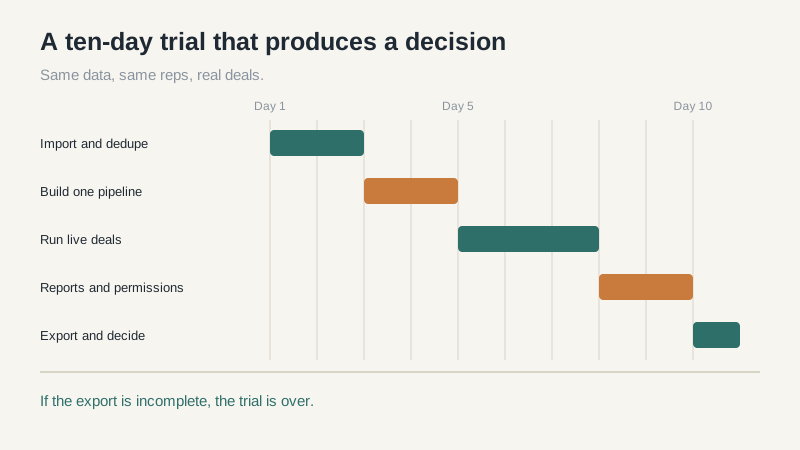
Most trials fail because people click around instead of running real work. Pick ten business days and treat them like a live pilot.
- Days one and two: import 500 real records, duplicates included, and see how the tool handles them.
- Days three and four: build one pipeline with your actual stages and required fields.
- Days five to seven: have two reps log every call, email, and meeting in the tool.
- Days eight and nine: build the report your manager asks for, then time how long it takes.
- Day ten: export contacts, activities, notes, and attachments. If the export is incomplete, stop.
Add one permission test. Create a rep who should see only their own deals and confirm they can’t see everyone else’s. Permission mistakes are harder to fix after rollout than during a trial.
Who Should Pick It, and Who Shouldn’t
Monday CRM fits teams of roughly five to twenty-five sellers who already work in boards, value speed of setup, and don’t need a formal forecast model. It fits companies where sales, marketing, and delivery share work and want one place to look. It fits the owner who will actually administer it.
The deciding factor is usually the admin, not the feature set. If nobody owns the board structure, columns multiply, stages drift, and the pipeline becomes a shared to-do list. Name that person before the trial, not after.
It’s a poor fit for complex territories, long enterprise cycles with multiple approvers, high-volume inbound lead routing, or a finance team that expects a forecast tied to opportunity history. Those teams will spend their time rebuilding logic the product doesn’t ship with.
Migration is the last thing to price. Importing contacts is simple. Importing years of notes, attachments, and activity history is not, and the lower tiers often cap storage. Get a sample export from your current tool before you sign, then ask the vendor to import that exact file during the trial.
If your reps already live in monday.com, this is an easy yes. If your sales process needs strict stage gates and forecast math, you’ll spend the year building workarounds. Compare it against a selection framework and a dedicated sales CRM before you decide.
